mirror of
https://github.com/smartcmd/MinecraftConsoles.git
synced 2026-08-20 09:57:09 +00:00
 83063f4b73
Conflict resolution summary:

- .gitignore: kept dedicated-server-specific ignore entries (tmp*/, _server_asset_probe/, server-data/) and also kept main-side entries (*.user, /out).

- Minecraft.Client/Common/Network/GameNetworkManager.cpp: kept int64_t seed from main and preserved dedicatedNoLocalHostPlayer logic from dedicated-server.

- Minecraft.Client/Windows64/Network/WinsockNetLayer.cpp: preserved dedicated-server shutdown flow and also included main-side cleanup for s_smallIdToSocketLock.
169 lines
6.5 KiB
Markdown
169 lines
6.5 KiB
Markdown
# MinecraftConsoles
|
|
|
|
[](https://discord.gg/jrum7HhegA)
|
|
|
|

|
|
|
|
## Introduction
|
|
|
|
This project contains the source code of Minecraft Legacy Console Edition v1.6.0560.0 (TU19) from https://archive.org/details/minecraft-legacy-console-edition-source-code, with some fixes and improvements applied.
|
|
|
|
## Download
|
|
Windows users can download our [Nightly Build](https://github.com/smartcmd/MinecraftConsoles/releases/tag/nightly)! Simply download the `.zip` file and extract it to a folder where you'd like to keep the game. You can set your username in `username.txt` (you'll have to make this file) and add servers to connect to in `servers.txt`
|
|
|
|
## Platform Support
|
|
|
|
- **Windows**: Supported for building and running the project
|
|
- **macOS / Linux**: The Windows nightly build may run through Wine or CrossOver based on community reports, but this is unofficial and not currently tested by the maintainers
|
|
|
|
## Features
|
|
|
|
- Fixed compilation and execution in both Debug and Release mode on Windows using Visual Studio 2022
|
|
- Added support for keyboard and mouse input
|
|
- Added fullscreen mode support (toggle using F11)
|
|
- (WIP) Disabled V-Sync for better performance
|
|
- Added a high-resolution timer path on Windows for smoother high-FPS gameplay timing
|
|
- Device's screen resolution will be used as the game resolution instead of using a fixed resolution (1920x1080)
|
|
- LAN Multiplayer & Discovery
|
|
- Added persistent username system via "username.txt"
|
|
|
|
## Multiplayer
|
|
|
|
Basic LAN multiplayer is available on the Windows build
|
|
|
|
- Hosting a multiplayer world automatically advertises it on the local network
|
|
- Other players on the same LAN can discover the session from the in-game Join Game menu
|
|
- Game connections use TCP port `25565` by default
|
|
- LAN discovery uses UDP port `25566`
|
|
- Add servers to your server list with `servers.txt` (temp solution)
|
|
- Rename yourself without losing data by keeping your `uid.dat`
|
|
|
|
Parts of this feature are based on code from [LCEMP](https://github.com/LCEMP/LCEMP) (thanks!)
|
|
|
|
### servers.txt
|
|
|
|
To add a server to your game, create the `servers.txt` file in the same directory as you have `Minecraft.Client.exe`. Inside, follow this format:
|
|
```
|
|
serverip.example.com
|
|
25565
|
|
The name of your server in UI!
|
|
```
|
|
|
|
For example, here's a valid servers.txt
|
|
```
|
|
1.1.1.1
|
|
25565
|
|
Cloudflare's Very Own LCE Server
|
|
127.0.0.1
|
|
25565
|
|
Localhost Test Crap
|
|
```
|
|
|
|
### Launch Arguments
|
|
|
|
| Argument | Description |
|
|
|--------------------|-----------------------------------------------------------------------------------------------------|
|
|
| `-name <username>` | Sets your in-game username. |
|
|
| `-fullscreen` | Launches the game in Fullscreen mode |
|
|
|
|
Example:
|
|
```
|
|
Minecraft.Client.exe -name Steve -fullscreen
|
|
```
|
|
|
|
## Dedicated Server in Docker (Wine)
|
|
|
|
This repository includes a lightweight Docker setup for running the Windows dedicated server under Wine.
|
|
**To build the image, a release build of `Minecraft.Server` is required.**
|
|
|
|
1. Build the dedicated server (`Minecraft.Server`) first.
|
|
2. Start with Docker Compose (server runtime files are copied into the image at build time):
|
|
|
|
```bash
|
|
docker compose -f docker-compose.dedicated-server.yml up -d
|
|
```
|
|
|
|
or use the helper script:
|
|
|
|
```bash
|
|
./start-dedicated-server.sh
|
|
```
|
|
|
|
You can explicitly choose runtime:
|
|
**However, debug builds often fail to run because some debug-related libraries are missing.**
|
|
|
|
```bash
|
|
./start-dedicated-server.sh release
|
|
./start-dedicated-server.sh debug
|
|
```
|
|
|
|
By default, build input is `x64/Minecraft.Server/Release`. Override it when needed (path must be inside this repository):
|
|
|
|
```bash
|
|
MC_RUNTIME_DIR=x64/Minecraft.Server/Debug docker compose -f docker-compose.dedicated-server.yml up -d --build
|
|
```
|
|
|
|
Useful environment variables:
|
|
- `XVFB_DISPLAY` (default: `:99`)
|
|
- `XVFB_SCREEN` (default: `64x64x16`, tiny virtual display used by Wine)
|
|
|
|
Fixed server runtime behavior in container:
|
|
- executable path: `/srv/mc/Minecraft.Server.exe`
|
|
- bind IP: `0.0.0.0`
|
|
- server port: `25565`
|
|
|
|
Persistent files are bind-mounted to host:
|
|
- `./server-data/server.properties` -> `/srv/mc/server.properties`
|
|
- `./server-data/GameHDD` -> `/srv/mc/Windows64/GameHDD`
|
|
|
|
## Controls (Keyboard & Mouse)
|
|
|
|
- **Movement**: `W` `A` `S` `D`
|
|
- **Jump / Fly (Up)**: `Space`
|
|
- **Sneak / Fly (Down)**: `Shift` (Hold)
|
|
- **Sprint**: `Ctrl` (Hold) or Double-tap `W`
|
|
- **Inventory**: `E`
|
|
- **Chat**: `T`
|
|
- **Drop Item**: `Q`
|
|
- **Crafting**: `C` Use `Q` and `E` to move through tabs (cycles Left/Right)
|
|
- **Toggle View (FPS/TPS)**: `F5`
|
|
- **Fullscreen**: `F11`
|
|
- **Pause Menu**: `Esc`
|
|
- **Attack / Destroy**: `Left Click`
|
|
- **Use / Place**: `Right Click`
|
|
- **Select Item**: `Mouse Wheel` or keys `1` to `9`
|
|
- **Accept or Decline Tutorial hints**: `Enter` to accept and `B` to decline
|
|
- **Game Info (Player list and Host Options)**: `TAB`
|
|
- **Toggle HUD**: `F1`
|
|
- **Toggle Debug Info**: `F3`
|
|
- **Open Debug Overlay**: `F4`
|
|
- **Toggle Debug Console**: `F6`
|
|
|
|
## Build & Run
|
|
|
|
1. Install [Visual Studio 2022](https://aka.ms/vs/17/release/vs_community.exe).
|
|
2. Clone the repository.
|
|
3. Open the project by double-clicking `MinecraftConsoles.sln`.
|
|
4. Make sure `Minecraft.Client` is set as the Startup Project.
|
|
5. Set the build configuration to **Debug** (Release is also OK but has some bugs) and the target platform to **Windows64**, then build and run.
|
|
|
|
### CMake (Windows x64)
|
|
|
|
```powershell
|
|
cmake -S . -B build -G "Visual Studio 17 2022" -A x64
|
|
cmake --build build --config Debug --target MinecraftClient
|
|
```
|
|
|
|
For more information, see [COMPILE.md](COMPILE.md).
|
|
|
|
## Known Issues
|
|
|
|
- Native builds for platforms other than Windows have not been tested and are most likely non-functional. The Windows nightly build may still run on macOS and Linux through Wine or CrossOver, but that path is unofficial and not currently supported
|
|
|
|
## Contributors
|
|
Would you like to contribute to this project? Please read our [Contributor's Guide](CONTRIBUTING.md) before doing so! This document includes our current goals, standards for inclusions, rules, and more.
|
|
|
|
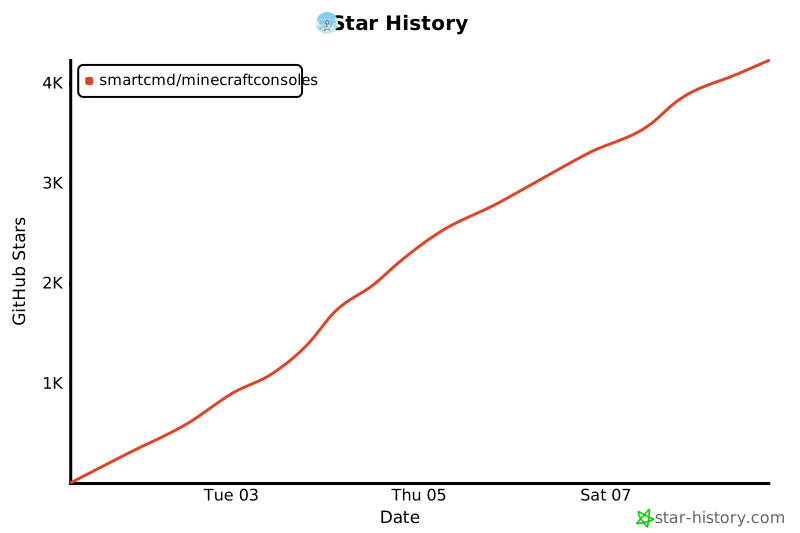
## Star History
|
|
|
|
[](https://www.star-history.com/?spm=a2c6h.12873639.article-detail.7.7b9d7fabjNxTRk#smartcmd/MinecraftConsoles&type=date&legend=top-left)
|