mirror of
https://github.com/smartcmd/MinecraftConsoles.git
synced 2026-04-25 16:37:21 +00:00
 f5f9aa1cf5
Theres documentation at https://sylvessa.zip/fourkit/ now. And a bunch of other changes. Check the discord server for a more comprehensive list
83 lines
2.6 KiB
Markdown
83 lines
2.6 KiB
Markdown
@page setup Setting up your Development Environment
|
|
|
|
You can use any IDE of choice. I recommend using Visual Studio for new developers.
|
|
|
|
Also make sure you have [.NET 10 SDK](https://dotnet.microsoft.com/en-us/download/dotnet/10.0) installed.
|
|
|
|
@section visual-studio Visual Studio
|
|
|
|
This tutorial will go over creating a plugin in Visual Studio.
|
|
|
|
When installing Visual Studio, make sure you have .NET SDK installed under Individual Components in the Visual Studio Installer.
|
|
|
|
After installing all the prerequisities, go to create a new Project and select Class Library for C#
|
|
|
|

|
|
|
|
After selecting class library and pressing OK, it should prompt what .NET version to use. Be sure to select .NET 10
|
|
|
|
You can name the project whatever you want.
|
|
|
|
After all thats done, you should enter the code environment.
|
|
|
|
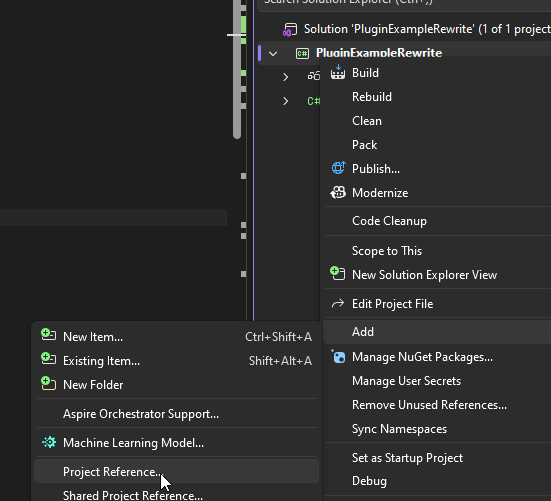
First thing you should do is right click your project and add a reference to the compiled FourKit DLL.
|
|
|
|
|
|
|
|
Afterwards a popup should appear. Click Browse and then browse to the DLL and then click OK.
|
|
|
|
After that you can continue to making a plugin!
|
|
|
|
@section dotnet Dotnet CLI
|
|
|
|
If you dont want to install Visual Studio, you can use the dotnet CLI program.
|
|
|
|
You can create a new dll project by running `dotnet new classlib -n MyAwesomePlugin`
|
|
|
|
Be sure to add a reference to the FourKit DLL in your csproj file (example for it being in parent dir):
|
|
|
|
```xml
|
|
<ItemGroup>
|
|
<Reference Include="Minecraft.Server.FourKit">
|
|
<HintPath>..\Minecraft.Server.FourKit.dll</HintPath>
|
|
</Reference>
|
|
</ItemGroup>
|
|
```
|
|
|
|
After this, you can build using `dotnet build`! Your compiled DLL should be in the `bin` folder.
|
|
|
|
To build as release: `dotnet build -c Release`
|
|
|
|
Make sure the target framework is set to `net10.0`!
|
|
|
|
Example full csproj file:
|
|
|
|
```xml
|
|
<Project Sdk="Microsoft.NET.Sdk">
|
|
|
|
<PropertyGroup>
|
|
<TargetFramework>net10.0</TargetFramework>
|
|
<ImplicitUsings>enable</ImplicitUsings>
|
|
<Nullable>enable</Nullable>
|
|
</PropertyGroup>
|
|
|
|
<ItemGroup>
|
|
<Reference Include="Minecraft.Server.FourKit">
|
|
<HintPath>..\Minecraft.Server.FourKit.dll</HintPath>
|
|
</Reference>
|
|
</ItemGroup>
|
|
|
|
</Project>
|
|
```
|
|
|
|
@section compiling Building your plugin
|
|
|
|
When you build your plugin, it will compile as a DLL.
|
|
|
|
You place this DLL into the `plugins` folder in your server directory.
|
|
|
|
You can also even have plugins with dependencies!
|
|
|
|
Below page will discuss actually making your plugin function, and using dependencies:
|
|
|
|
@ref plugin-creation |