
# MinecraftConsoles (Legacy Console Revelations Edition)
If you have any questions regarding this fork, this is my Fluxer server (similar to a Discord server):

This project is based on source code of Minecraft Legacy Console Edition v1.6.0560.0 (TU19) with some fixes and improvements applied.
## Latest:
Piston fix for dedicated servers:
- Fixed a bug where pistons would permanently break server-wide on dedicated servers when a redstone clock ran long enough. The piston update lock (`ignoreUpdate`) was set at the start of `triggerEvent` but never cleared on three early-return paths, permanently blocking all piston neighbor updates for the rest of the session. A fast clock would eventually hit one of these paths (e.g. signal state changing between event queuing and processing), locking out every piston in the world
Chunk unloading and connection stability fixes:
- Fixed a regression where chunks outside the player's immediate vicinity would fail to load on dedicated servers, leaving giant missing areas. The server's chunk drop function was immediately removing chunks from the cache instead of queuing them for the existing save/unload pipeline, which meant chunks were never saved, never moved to the recovery cache, and their entities (item frames, paintings, etc.) were never removed from the level before being reloaded, causing entity duplication
- Fixed the server's `dropAll()` and autosave chunk cleanup iterating the loaded chunk list while simultaneously modifying it (undefined behavior that could corrupt chunk tracking or stall the server)
- Removed an overly aggressive `dropAll()` call that wiped the entire chunk cache whenever render distance decreased, instead of only removing the out-of-range chunks
- Fixed a client-side connection bug where a 5-second socket recv timeout (used during the initial server handshake) was never cleared after connecting. This meant any brief server pause longer than 5 seconds (e.g. autosave, chunk I/O) would cause the client to interpret the silence as a lost connection and disconnect
Dedicated server biome diversity fix:
- The dedicated server previously used a completely random seed with no biome diversity checks, unlike the client which validates seeds to guarantee varied biomes. This could result in server worlds with large regions dominated by only one or two biome types (e.g. all taiga/snowy)
- On top of that, the client's seed validation was hardcoded to only check a 54-chunk (Classic) area, so even validated seeds had no diversity guarantee beyond that. This made the problem especially noticeable on Large worlds or worlds expanded from Classic to Large
- New server worlds now validate seeds for biome diversity, and the validation scales to the full target world size
- Added `override-seed` in server.properties to fix existing worlds without deleting them. Set it to any seed number and newly generated chunks will use it instead of the original
Server list and connection improvements:
- Server edits and deletions now apply immediately without needing to restart the game
- Connecting to an offline/unreachable server no longer freezes the game indefinitely
- Connection attempts use non-blocking sockets with a 5-second timeout (3 retries max) instead of the OS TCP timeout
- Connection runs on a background thread so the UI stays responsive, with a cancel option (press B or Escape) to back out at any time
- Failed connections now always show a "Connection Failed" dialog instead of silently navigating back
Upstream merge:
- Fixed font rendering for color and formatting codes, splash text like "Colormatic!" now renders with proper per-character colors
- Fixed Sign editing UI, SignEntryMenu720 restored to correct version
- Stained glass and stained glass panes are now craftable in survival mode with full crafting UI support
- Clicking outside a container inventory while holding an item now drops it, matching Java Edition behavior
- Item lore text now displays on hover for items with NBT lore data
- Increased entity limits: boats 40→60, minecarts 40→60, fireballs 200→300, projectiles 300→400
- Fixed missing trapped chest textures in Natural Texture Pack
- Debug packet handling now properly gated behind debug builds
Music context fixes:
- Menu music (menu1-4) now plays only on the title screen
- creative music (creative1-6) only plays in creative mode
- survival mode plays only calm/hal/nuance/piano tracks
Performance optimizations across rendering, audio, and entity systems!
- Renderer: column-level frustum culling and compact visible-chunk lists skip thousands of empty iterations per frame; lightweight second-pass render path avoids redundant checks
- Sound engine: filesystem probe results are now cached, eliminating repeated file-existence checks every time a sound plays; sounds are pre-decoded for smoother playback
- Entity movement: reduced `shared_from_this()` overhead by caching the shared pointer; `dynamic_pointer_cast` replaced with a raw pointer cast guarded by `instanceof`
- Chunk updates: early-out for non-dirty chunks in the update loop; scaled recheck period at high render distances
- Threading: entity query locking consolidated at the `Level` layer on all platforms for consistent thread safety
- Block breaking: server now skips redundant tile-update packets when a block is successfully destroyed
Migrated to CMake build system (upstream)!
- Project now builds with CMake instead of Visual Studio project files
- Use `cmake --preset windows64` or open the repo folder directly in Visual Studio (it detects `CMakeLists.txt` automatically)
- Old `.vcxproj`/`.sln` files are preserved on the `vs-build` branch if needed
Multi-language font rendering and Unicode text input!
- Type and read text/characters in Japanese, Chinese, Korean, Thai, Arabic, Hindi, and many more languages
- Works in: chat, signs, world names, seeds, server address/port fields
- Two rendering systems: Iggy UI uses a new unicode bitmap fallback font; legacy C++ renderer uses Java Minecraft's glyph page system
- Arabic text shaping: proper contextual letter forms and right-to-left visual reordering in chat and UI
- Security: blocked Unicode bidirectional override characters to prevent chat spoofing
- Fixed a pre-existing memory leak in sign loading
Added copy+paste support for IP/Port, world names, world seeds, server names, signs, etc.
- Just use control+v to paste from your clipboard!
Dedicated server releases support Hardcore Mode!
- Dedicated server is fully compatible with `smartcmd/MinecraftConsoles` clients, even with hardcore mode!
- Client (`LCREWindows64.zip`): download from the Nightly release on GitHub
- Dedicated Server (`LCREServerWindows64.zip`): download from the Nightly-Dedicated-Server release on GitHub
- Docker: pull `ghcr.io/itsrevela/minecraft-lce-dedicated-server:nightly` for server container
In-game screenshot functionality with F2!
- pressing F2 will save a screenshot to a `screenshots` folder in your root game directory
- a local-only chat message is shown to the player notifying the screenshot filename that was saved
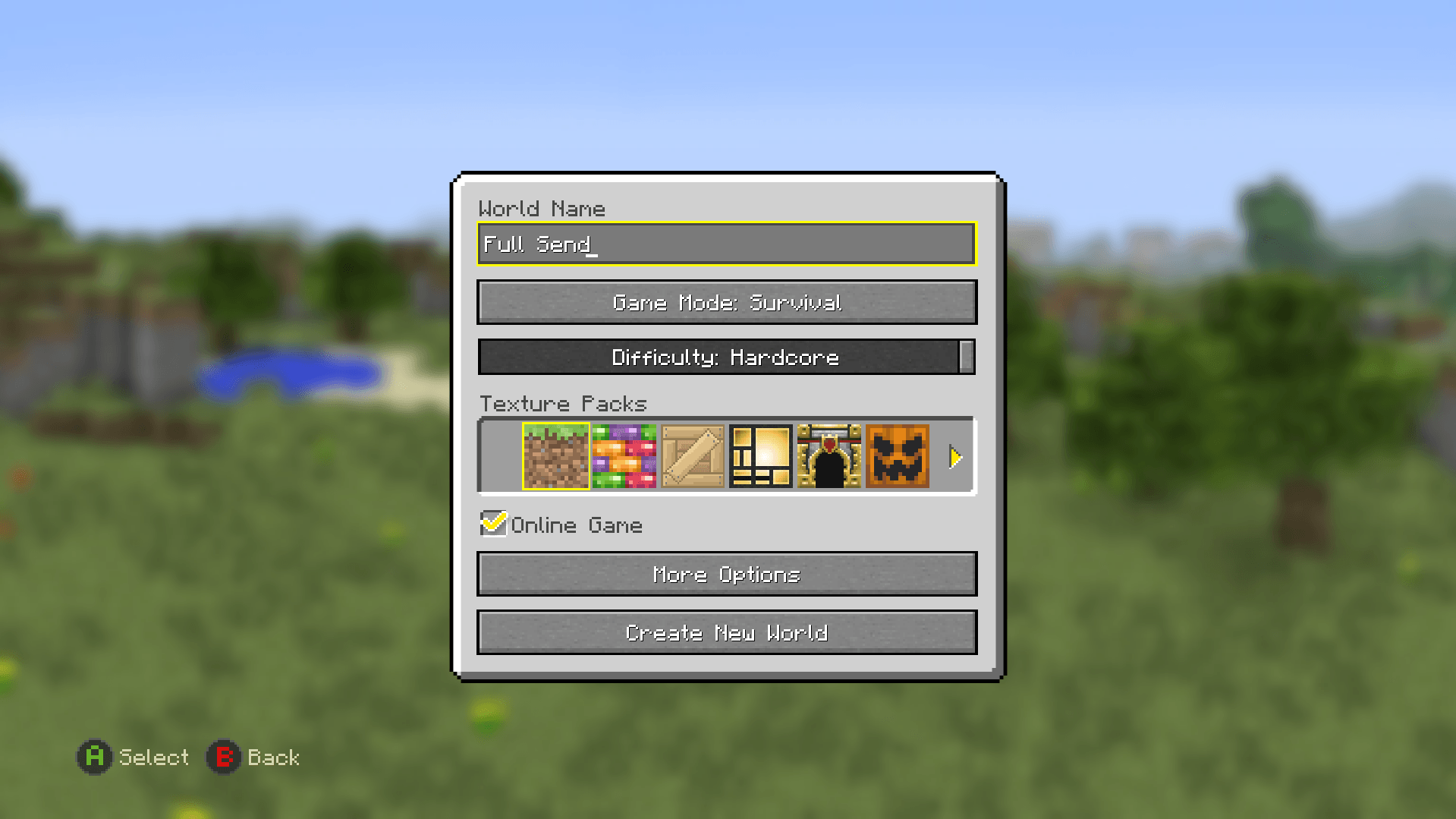
Proper implementation of Hardcore Mode in LCRE!
- difficulty slider included in create world menu
- difficulty slider forces "Difficulty: Hardcore" on world load
- singleplayer: host death, force no respawn, on exit deletes world
- multiplayer: host death = world delete upon exit --- joiner death = only exit available, persists upon rejoin (no respawn option)
- multiplayer fixes: added fix to prevent host from using exit-without-saving loophole for nonhost players that died
- to-do: hardcore hearts texture
The current goal of MinecraftConsoles is to be a multi-platform base for further development, such as modding, backports, and anything else LCE. On top of that, we're working to make this a quality experience on Desktop with or without a controller while (long-term) retaining console support.
See our our [Contributor's Guide](./CONTRIBUTING.md) for more information on the goals of this project.
## Download
### Client
Windows users can download our [Nightly Build](https://github.com/itsRevela/MinecraftConsoles/releases/tag/Nightly)! Simply download the `.zip` file and extract it to a folder where you'd like to keep the game. You can set your username in `username.txt` (you'll have to make this file)
### Server
If you're looking for Dedicated Server software (with hardcore-mode functionality), download its [Nightly Build here](https://github.com/itsRevela/MinecraftConsoles/releases/tag/Nightly-Dedicated-Server). Similar instructions to the client more or less, though see further down in this README for more info on that.
## Platform Support
- **Windows**: Supported for building and running the project
- **macOS / Linux**: The Windows nightly build will run through Wine or CrossOver based on community reports, but this is unofficial and not currently tested by the maintainers when pushing updates
- **Android**: The Windows nightly build does run but has stability / frametime pacing issues frequently reported
- **iOS**: No current support
- **All Consoles**: Console support remains in the code, but maintainers are not currently verifying console functionality / porting UI Changes to the console builds at this time.
## Features
- Dedicated Server Software (`Minecraft.Server.exe`)
- Fixed compilation and execution in both Debug and Release mode on Windows using Visual Studio 2022
- Added support for keyboard and mouse input
- Added fullscreen mode support (toggle using F11)
- (WIP) Disabled V-Sync for better performance
- Added a high-resolution timer path on Windows for smoother high-FPS gameplay timing
- Device's screen resolution will be used as the game resolution instead of using a fixed resolution (1920x1080)
- LAN Multiplayer & Discovery
- Added persistent username system via `username.txt`
- Decoupled usernames and UIDs to allow username changes
- Fixed various security issues present in the original codebase
- Splitscreen Multiplayer support (connect to dedicated servers, etc)
- In-game server management (Add Server button, etc)
## Controls (Keyboard & Mouse)
- **Movement**: `W` `A` `S` `D`
- **Jump / Fly (Up)**: `Space`
- **Sneak / Fly (Down)**: `Shift` (Hold)
- **Sprint**: `Ctrl` (Hold) or Double-tap `W`
- **Inventory**: `E`
- **Chat**: `T`
- **Drop Item**: `Q`
- **Crafting**: `C` Use `Q` and `E` to move through tabs (cycles Left/Right)
- **Toggle View (FPS/TPS)**: `F5`
- **Fullscreen**: `F11`
- **Pause Menu**: `Esc`
- **Attack / Destroy**: `Left Click`
- **Use / Place**: `Right Click`
- **Select Item**: `Mouse Wheel` or keys `1` to `9`
- **Accept or Decline Tutorial hints**: `Enter` to accept and `B` to decline
- **Game Info (Player list and Host Options)**: `TAB`
- **Toggle HUD**: `F1`
- **Toggle Debug Info**: `F3`
- **Open Debug Overlay**: `F4`
- **Toggle Debug Console**: `F6`
## Contributors
Would you like to contribute to this project? Please read our [Contributor's Guide](CONTRIBUTING.md) before doing so! This document includes our current goals, standards for inclusions, rules, and more.
## Client Launch Arguments
| Argument | Description |
|--------------------|-----------------------------------------------------------------------------------------------------|
| `-name ` | Overrides your in-game username. |
| `-fullscreen` | Launches the game in Fullscreen mode |
Example:
```
Minecraft.Client.exe -name Steve -fullscreen
```
## LAN Multiplayer
LAN multiplayer is available on the Windows build
- Hosting a multiplayer world automatically advertises it on the local network
- Other players on the same LAN can discover the session from the in-game Join Game menu
- Game connections use TCP port `25565` by default
- LAN discovery uses UDP port `25566`
- Add servers to your server list with the in-game Add Server button (temp)
- Rename yourself without losing data by keeping your `uid.dat`
- Split-screen players can join in, even in Multiplayer
# Dedicated Server Software
## About `server.properties`
`Minecraft.Server` reads `server.properties` from the executable working directory (Docker image: `/srv/mc/server.properties`).
If the file is missing or contains invalid values, defaults are auto-generated/normalized on startup.
Important keys:
| Key | Values / Range | Default | Notes |
|-----|-----------------|---------|-------|
| `server-port` | `1-65535` | `25565` | Listen TCP port |
| `server-ip` | string | `0.0.0.0` | Bind address |
| `server-name` | string (max 16 chars) | `DedicatedServer` | Host display name |
| `max-players` | `1-8` | `8` | Public player slots |
| `level-name` | string | `world` | Display world name |
| `level-id` | safe ID string | derived from `level-name` | Save folder ID; normalized automatically |
| `level-seed` | int64 or empty | empty | Empty = random seed |
| `world-size` | `classic\|small\|medium\|large` | `classic` | World size preset for new worlds and expansion target for existing worlds |
| `log-level` | `debug\|info\|warn\|error` | `info` | Server log verbosity |
| `autosave-interval` | `5-3600` | `60` | Seconds between autosaves |
| `white-list` | `true/false` | `false` | Enable access list checks |
| `lan-advertise` | `true/false` | `false` | LAN session advertisement |
Minimal example:
```properties
server-name=DedicatedServer
server-port=25565
max-players=8
level-name=world
level-seed=
world-size=classic
log-level=info
white-list=false
lan-advertise=false
autosave-interval=60
```
## Dedicated Server launch arguments
The server loads base settings from `server.properties`, then CLI arguments override those values.
| Argument | Description |
|----------|-------------|
| `-port <1-65535>` | Override `server-port` |
| `-ip ` | Override `server-ip` |
| `-bind ` | Alias of `-ip` |
| `-name ` | Override `server-name` (max 16 chars) |
| `-maxplayers <1-8>` | Override `max-players` |
| `-seed ` | Override `level-seed` |
| `-loglevel ` | Override `log-level` (`debug`, `info`, `warn`, `error`) |
| `-help` / `--help` / `-h` | Print usage and exit |
Examples:
```powershell
Minecraft.Server.exe -name MyServer -port 25565 -ip 0.0.0.0 -maxplayers 8 -loglevel info
Minecraft.Server.exe -seed 123456789
```
## Dedicated Server in Docker (Wine)
This repository includes a lightweight Docker setup for running the Windows dedicated server under Wine.
### Quick Start (No Build, Recommended)
No local build is required. The container image is pulled from GHCR.
```bash
./start-dedicated-server.sh
```
`start-dedicated-server.sh` does the following:
- uses `docker-compose.dedicated-server.ghcr.yml`
- pulls latest image, then starts the container
If you want to skip pulling and just start:
```bash
./start-dedicated-server.sh --no-pull
```
Equivalent manual command:
```bash
docker compose -f docker-compose.dedicated-server.ghcr.yml up -d
```
### Local Build Mode (Optional)
Use this only when you want to run your own locally built `Minecraft.Server` binary in Docker.
**A local build of `Minecraft.Server` is required for this mode.**
```bash
docker compose -f docker-compose.dedicated-server.yml up -d --build
```
Useful environment variables:
- `XVFB_DISPLAY` (default: `:99`)
- `XVFB_SCREEN` (default: `64x64x16`, tiny virtual display used by Wine)
Fixed server runtime behavior in container:
- executable path: `/srv/mc/Minecraft.Server.exe`
- bind IP: `0.0.0.0`
- server port: `25565`
Persistent files are bind-mounted to host:
- `./server-data/server.properties` -> `/srv/mc/server.properties`
- `./server-data/GameHDD` -> `/srv/mc/Windows64/GameHDD`
## Build & Run
1. Install [Visual Studio 2022](https://aka.ms/vs/17/release/vs_community.exe) or [newer](https://visualstudio.microsoft.com/downloads/).
2. Clone the repository.
3. Open the project folder from Visual Studio.
4. Set the build configuration to **Windows64 - Debug** (Release is also ok but missing some debug features), then build and run.
### CMake (Windows x64)
```powershell
cmake --preset windows64
cmake --build --preset windows64-debug --target Minecraft.Client
```
For more information, see [COMPILE.md](COMPILE.md).
## Star History
[](https://www.star-history.com/?spm=a2c6h.12873639.article-detail.7.7b9d7fabjNxTRk#smartcmd/MinecraftConsoles&type=date&legend=top-left)