# MinecraftConsoles
If you have any questions regarding this fork, this is my Fluxer server (similar to a Discord server):

## Latest:
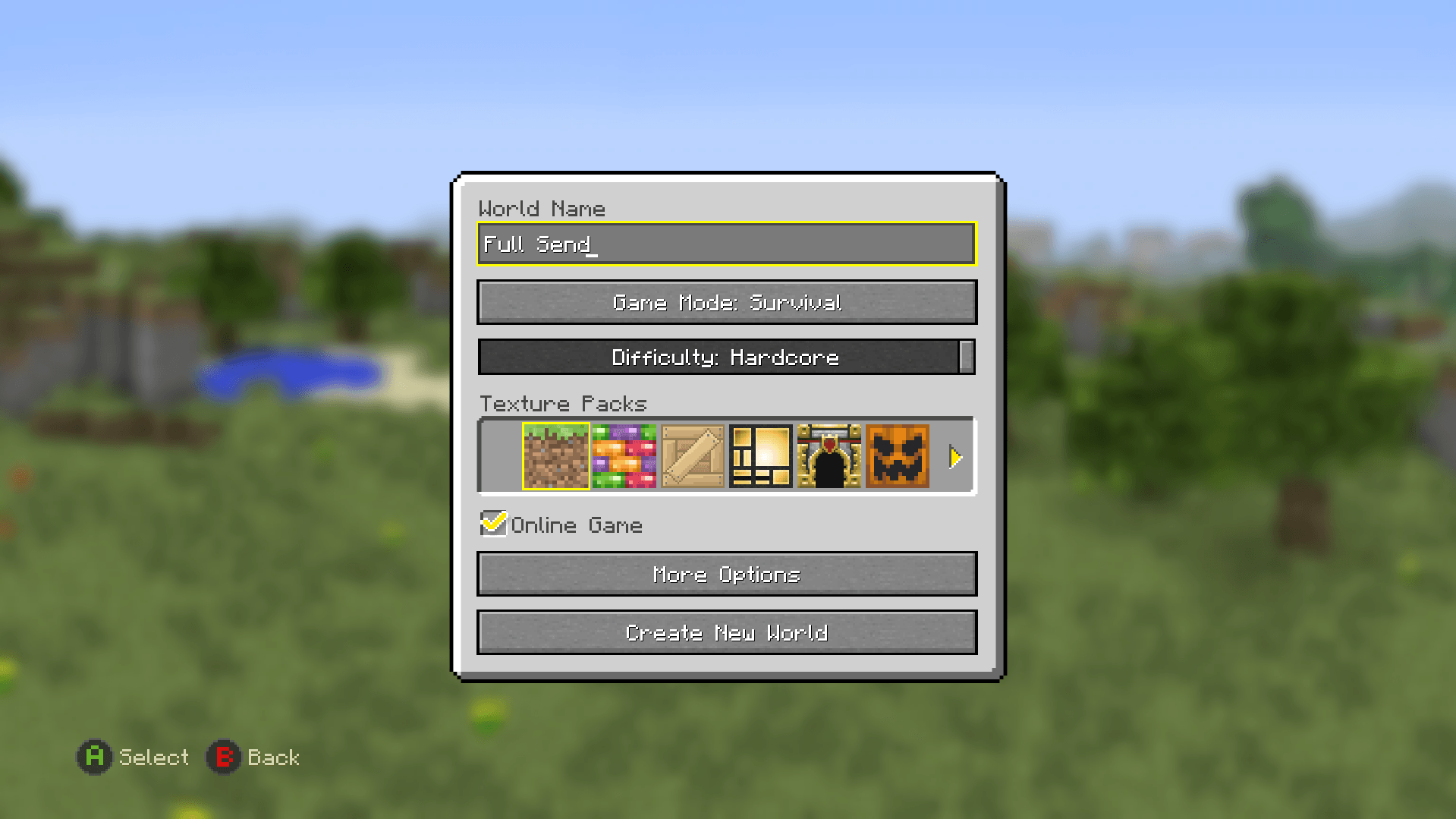
Proper implementation of Hardcore Mode in LCE!
- difficulty slider included in create world menu
- difficulty slider forces "Difficulty: Hardcore" on world load
- singleplayer: host death, force no respawn, on exit deletes world
- multiplayer: host death = world delete upon exit --- joiner death = only exit available, persists upon rejoin (no respawn option)
## Introduction
This project contains the source code of Minecraft Legacy Console Edition v1.6.0560.0 (TU19) with some fixes and improvements applied.
## Download
Windows users can download our [Nightly Build](https://github.com/itsRevela/MinecraftConsoles/releases/tag/Nightly)! Simply download the `.zip` file and extract it to a folder where you'd like to keep the game. You can set your username in `username.txt` (you'll have to make this file)
## Platform Support
- **Windows**: Supported for building and running the project
- **macOS / Linux**: The Windows nightly build may run through Wine or CrossOver based on community reports, but this is unofficial and not currently tested by the maintainers
## Features
- Fixed compilation and execution in both Debug and Release mode on Windows using Visual Studio 2022
- Added support for keyboard and mouse input
- Added fullscreen mode support (toggle using F11)
- (WIP) Disabled V-Sync for better performance
- Added a high-resolution timer path on Windows for smoother high-FPS gameplay timing
- Device's screen resolution will be used as the game resolution instead of using a fixed resolution (1920x1080)
- LAN Multiplayer & Discovery
- Added persistent username system via "username.txt"
## Multiplayer
Basic LAN multiplayer is available on the Windows build
- Hosting a multiplayer world automatically advertises it on the local network
- Other players on the same LAN can discover the session from the in-game Join Game menu
- Game connections use TCP port `25565` by default
- LAN discovery uses UDP port `25566`
- Add servers to your server list with the in-game Add Server button (temp)
- Rename yourself without losing data by keeping your `uid.dat`
Parts of this feature are based on code from [LCEMP](https://github.com/LCEMP/LCEMP) (thanks!)
### Launch Arguments
| Argument | Description |
|--------------------|-----------------------------------------------------------------------------------------------------|
| `-name ` | Sets your in-game username. |
| `-fullscreen` | Launches the game in Fullscreen mode |
Example:
```
Minecraft.Client.exe -name Steve -fullscreen
```
## Controls (Keyboard & Mouse)
- **Movement**: `W` `A` `S` `D`
- **Jump / Fly (Up)**: `Space`
- **Sneak / Fly (Down)**: `Shift` (Hold)
- **Sprint**: `Ctrl` (Hold) or Double-tap `W`
- **Inventory**: `E`
- **Chat**: `T`
- **Drop Item**: `Q`
- **Crafting**: `C` Use `Q` and `E` to move through tabs (cycles Left/Right)
- **Toggle View (FPS/TPS)**: `F5`
- **Fullscreen**: `F11`
- **Pause Menu**: `Esc`
- **Attack / Destroy**: `Left Click`
- **Use / Place**: `Right Click`
- **Select Item**: `Mouse Wheel` or keys `1` to `9`
- **Accept or Decline Tutorial hints**: `Enter` to accept and `B` to decline
- **Game Info (Player list and Host Options)**: `TAB`
- **Toggle HUD**: `F1`
- **Toggle Debug Info**: `F3`
- **Open Debug Overlay**: `F4`
- **Toggle Debug Console**: `F6`
## Build & Run
1. Install [Visual Studio 2022](https://aka.ms/vs/17/release/vs_community.exe).
2. Clone the repository.
3. Open the project by double-clicking `MinecraftConsoles.sln`.
4. Make sure `Minecraft.Client` is set as the Startup Project.
5. Set the build configuration to **Debug** (Release is also ok but missing some debug features) and the target platform to **Windows64**, then build and run.
### CMake (Windows x64)
```powershell
cmake -S . -B build -G "Visual Studio 17 2022" -A x64
cmake --build build --config Debug --target MinecraftClient
```
For more information, see [COMPILE.md](COMPILE.md).
## Known Issues
- Native builds for platforms other than Windows have not been tested and are most likely non-functional. The Windows nightly build may still run on macOS and Linux through Wine or CrossOver, but that path is unofficial and not currently supported
## Contributors
Would you like to contribute to this project? Please read our [Contributor's Guide](CONTRIBUTING.md) before doing so! This document includes our current goals, standards for inclusions, rules, and more.
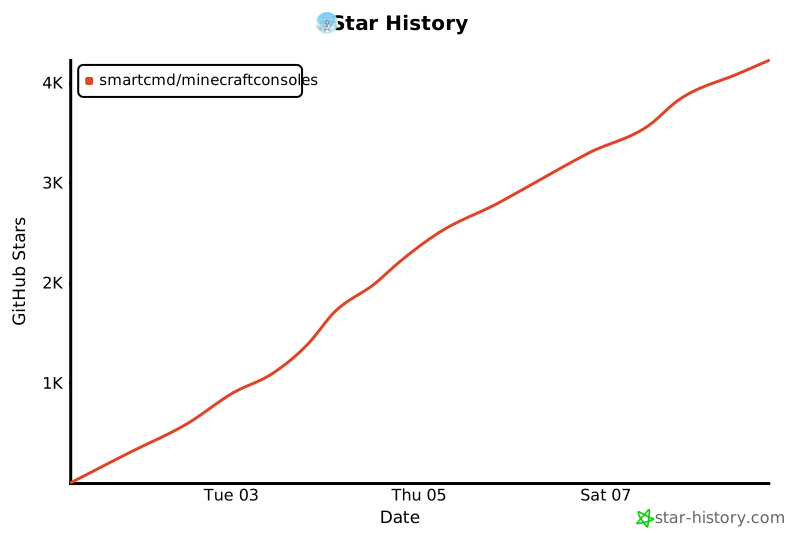
## Star History
[](https://www.star-history.com/?spm=a2c6h.12873639.article-detail.7.7b9d7fabjNxTRk#smartcmd/MinecraftConsoles&type=date&legend=top-left)